Software that fits the shop you actually run

Easy Shop is an automotive service solution for auto collision, auto hail and mechanical repair. Most shop systems hand you every screen they have ever built and let you find your way; this one starts with seven modules every shop needs, and you add the rest when the work calls for them.

Built by a collision and repair operator. In daily use in a working shop.

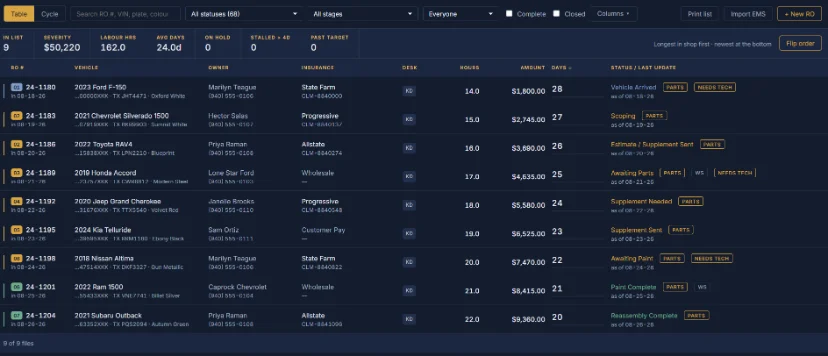
The Easy Shop job board: every vehicle in the shop listed by repair stage, with its age and assigned technician

Production management

The questions you ask all day, answered on the screen

Nobody should have to walk the shop, call the parts desk and open a spreadsheet to find out where the week stands. The information is already in the system. It shows it to you.

What do I have in the shop?

The board, one screen, every car in the building with its stage, its age and who is on it. No walking the floor to find out.

What did we run this month?

Closed files book to a date you set, so the month's revenue, cycle times and counts are a report rather than a reconstruction.

How much do we need to collect?

Every file carries what was billed and what has been paid. Unpaid closed files are a list you can work down, not a surprise.

Twelve modules

Seven you're given. Five you choose.

Every module shares one set of customers, cars and jobs, so nothing is entered twice and nothing has to be kept in step by hand. There is no tier to climb out of — a module is either running in your shop or it isn't.

Included Every shop, from day one

Modules included with every shop

  • Customer check-inThe one screen your customers touch. Keys, contact, and what they came in for.
  • Job boardEvery car in the shop on one board, moved by dragging it into its next status.
  • LeadsEveryone who came by for an estimate, and when it is time to reach back out.
  • Wholesale accountsTrade customers, their rates, and what each of them owes you.
  • Insurance workClaim, adjuster, supplements and approval dates carried on the job.
  • Estimate importingImport estimates from CCC One and Mitchell — parts, labor hours, and the claim details.
  • ReportingWhat came in, what went out, and where the week actually went.
Add when needed Switch on, switch off

Optional modules

  • SalesSales can be anywhere — at the doors, on the phone, in the parking lot. One screen, one hand.
  • InvoicingRetail, insurance and wholesale invoices off the job record, with statements and aging.
  • Parts trackingWhat is ordered, what has landed, what the board is waiting on, and what it cost.
  • Customer and staff updates via SMSKeep everyone informed of where the vehicle is in the process.
  • Multi-shop administrationTwo or more locations under one sign-in, each with its own database.

Automotive production management

What the modules actually do

Included

The board is the shop

Every open file sits in its real stage — teardown, PDR, body, paint, reassembly, QC, ready. Drag a car forward and everyone who needs to know is told. This is the production management half of the system, and it is the screen most of the shop lives on.

  • Collision, hail and combination shops each get their own lane and status set
  • Lanes and statuses are yours to name and reorder
  • Total losses sort to the top and turn red
  • Filter to one technician, or to the cars with nobody on them
  • Print exactly what is filtered on screen
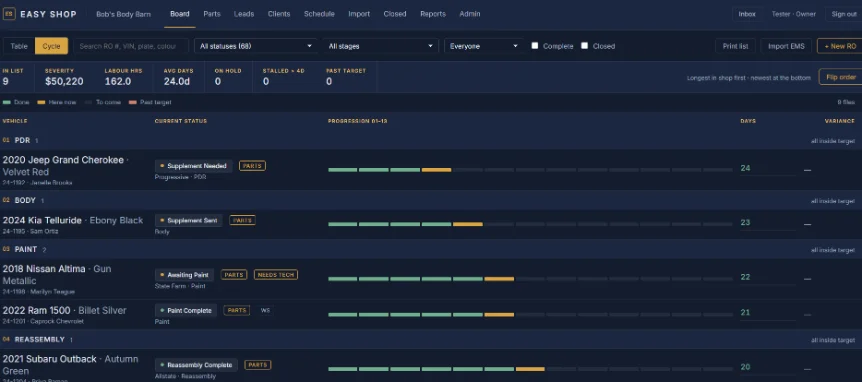
Easy Shop job board grouped by repair stage, with vehicle age and assigned technician on each row
Included

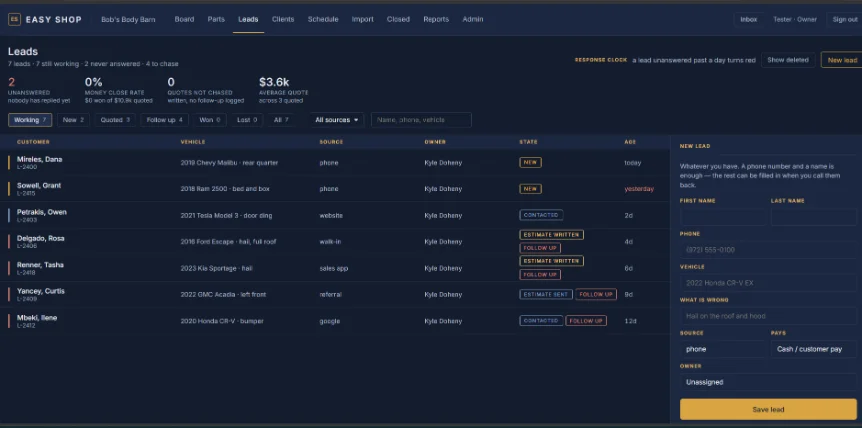
Leads, without a form to fill out

Somebody comes by for an evaluation or an estimate. You take their information once, at the counter, and the system tells you when it is time to reach back out.

  • Write the estimate on the lead at the counter, and the amount stays with it
  • A configurable stretch of silence flags the lead for chasing
  • Book the appointment from the lead itself
  • Won and lost are counted against what was quoted, not guessed at
The Easy Shop leads screen, showing each lead's state, age and who owns the follow-up
Add when needed

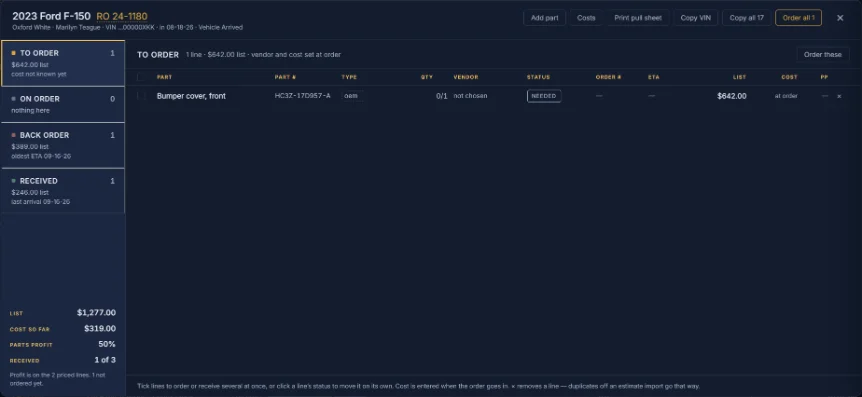
Parts, from ordered to on the car

Lines grouped by what is happening to them — to order, on order, back order, received — with the order number, the vendor and the ETA on every one.

  • Late ETAs go red with the days they are late
  • A short shipment stays on order for what is still owed
  • Cost goes in when the invoice turns up, not before
  • Pull sheets print for ordering, for what is out, and for what came in
Parts tracking in Easy Shop, with lines grouped by order status and their vendor, order number and ETA
Included

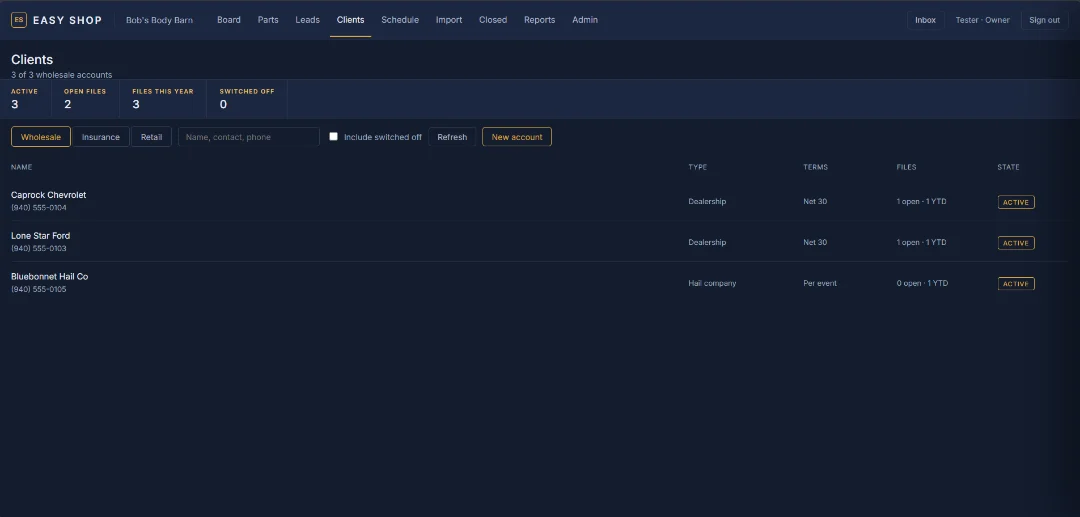
Wholesale accounts that bill the way you quote

Trade work is not retail work. Wholesale customers keep their own rates, their own invoices and their own balance, and nothing about them has to be re-typed per job.

  • One client directory shared with the rest of the system
  • Descriptions are remembered; prices never are
  • Statements and aging per account
  • Wholesale records are kept as your business record, not aged out
The Easy Shop client directory listing wholesale trade accounts alongside retail customers
Included

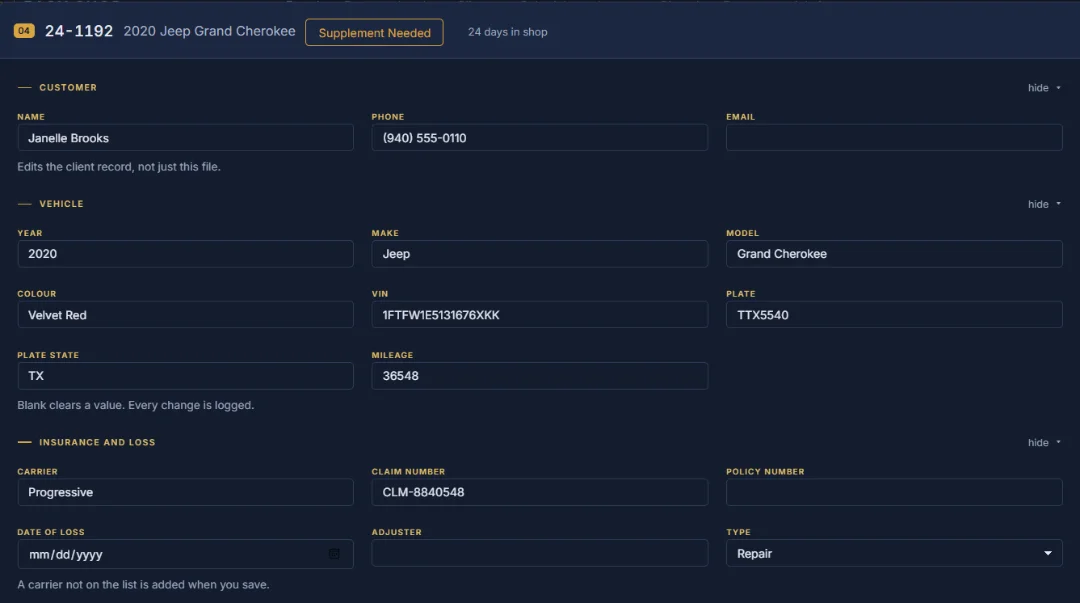
Insurance work with the claim on the file

Carrier, policy, claim number, deductible, date of loss, adjuster and estimator ride on the job. Import the estimate from CCC One or Mitchell and they fill themselves in, along with the parts lines and the labor hours.

  • Supplements tracked as their own checkpoints in each lane
  • Approved amounts overwrite the guess, and every change is recorded
  • Estimate written and estimate sent are separate states
  • Nothing is overwritten quietly — before and after are both kept
A repair order in Easy Shop showing carrier, claim number, deductible and adjuster details on the file
Add when needed

People find out without being told

A status change, a part arriving, a lead going quiet — the person who needs that fact gets it, and nobody else is copied for the sake of it.

  • Every event is a switch each person sets for themselves
  • Status changes can be scoped to only the cars you are on
  • Sends are capped so a busy morning is not fifty emails
  • Text messages are next, sharing the same wording
Per-event notification settings in Easy Shop, one switch per kind of notification
Included

Reporting you can stand behind

The numbers come off the same records the shop runs on, so a report is never a second set of books somebody has to keep in step.

  • Closed files keyed on the date you book them to
  • Cycle time in-to-ready, rental in-to-picked-up, A/R picked-up-to-paid
  • Parts margin per file and per line
  • Payroll and commission run off what the close-out actually settled
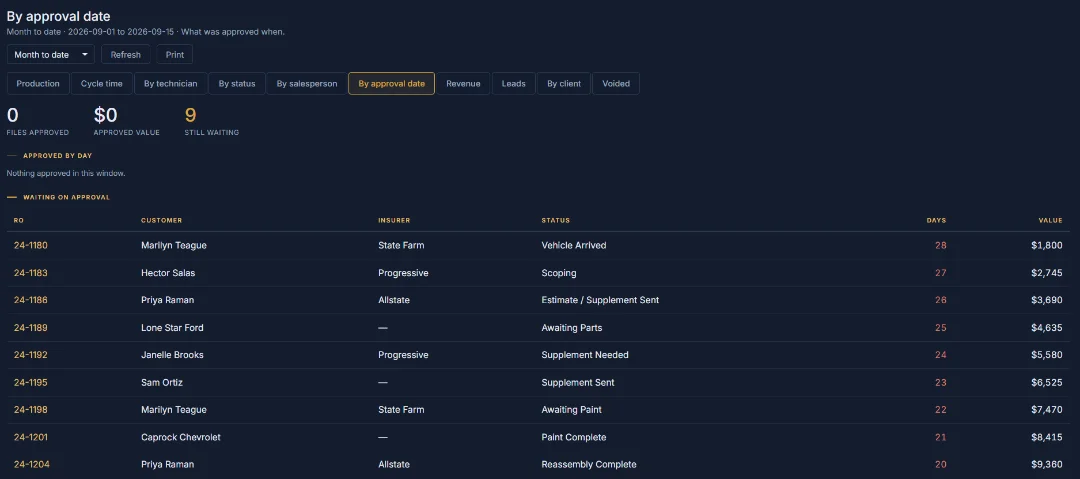
The Easy Shop reports screen, showing closed files, revenue and cycle time for a chosen date range

Access

Every permission is yours to set

There are no fixed job titles to squeeze your people into. You define the roles your shop actually has, name them what you call them, and tick exactly what each one may see and change.

Technicians get their own logins. A tech can be given the hours on a car without being shown what it bills, and can be limited to the cars assigned to them. Someone holding two roles gets the sum of both.

Roles you define
Owner and Technician are the only fixed ones, and you can rename both. Everything else is a row you name, tick and delete.
Technician logins
Every tech signs in as themselves. Their work, their hours, their cars.
Money is not one switch
File totals, parts cost and margin, and commission are three separate ticks. Labor hours is a fourth, separate from money entirely.
Only their own work
One tick per role narrows the board, the leads and the schedule to what that person is assigned.
Every change is recorded
Who changed what, when, and what it was before. Append-only, and nobody can edit it.

Coming next

In build, not yet live
Online forms into Leads
A form on your own site that posts straight into your leads, with the same follow-up clock.
Leads from funnels
Ad and funnel traffic arriving as leads, tagged with where it came from so you can see what works.
Online scheduling
A customer picks a slot and it lands on your schedule.

About

Built by someone who has run the shop

Easy Shop is directed and built by Chris Johnson, who has spent nearly two decades in the industry. He has worked with the major collision repairers, run operations for multi-million-dollar companies, and consults with repair shops on how they run.

In 2022 he opened his own repair company, which is still running today — and still running on this software.

Read the whole story
Chris Johnson, founder of Easy Shop and Storm Rider Solutions

Questions

Before you ask

Can I add modules later?

Yes, and that is the point. Start with the seven every shop gets and turn on the others the month the work calls for them. Adding one does not move you to a different product or reset anything you have already entered, and turning one off again keeps the records it created.

How long does setup take?

It depends on the shop. A single-location shop with clean customer records is quick; a shop with years of history, several locations or a wholesale book to bring across takes longer. We will tell you what yours looks like after the demo rather than quote you a number now.

Does it work on a phone or tablet in the bay?

Yes. The board, the file, parts and check-in all work on a phone, and the sales screen is built for a phone on purpose. Technician logins work the same way, so a tech can see their own cars without walking to the office.

Who owns my data?

You do. The shop's data is only theirs, there is no cross over, and no one else has access to your customer and client information. Each shop has its own separate database.

What happens to old closed jobs?

A closed file is kept as a record. After a year it moves to archival storage, and personal details have a ten-year outer limit. The accounting shell — the RO number, the dates, the amounts and the labor — is never purged, because that is your business record. Wholesale and insurance client records are never purged.

Book a demo

See it on your own shop's work

Tell us how the shop runs and which modules sound like they'd earn their place. We'll walk the screens with you rather than show you a slide deck.

We will get back to you the same day where we can.